Why AI Generated Video Still Looks Like AI- and How To Fix It
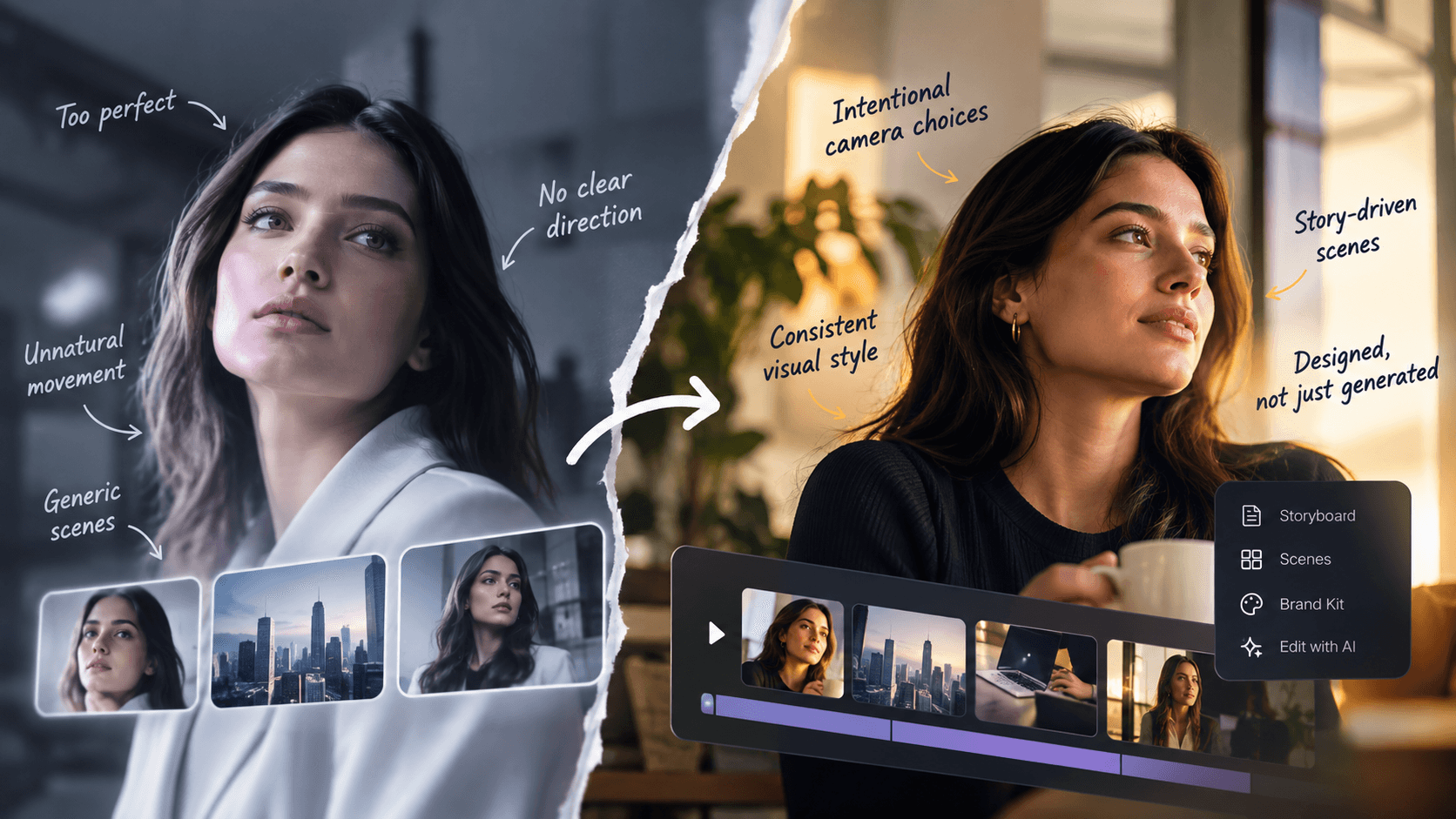
AI video has become much better at looking real.
Faces hold together longer. Movement is smoother. Lighting looks more convincing. In some short clips, it's already hard to tell generated footage from camera-shot footage.
So why can you still watch an AI-generated brand video and know almost immediately that it was made with AI?
Often, the problem is no longer one obviously broken frame. It is the lack of creative decisions across the whole video.
A realistic clip and a well-produced video are two different things. You can generate five beautiful shots and still end up with a video that feels generic, inconsistent, or strangely artificial.
The goal, then, is not simply to hide AI. It is to make AI stop being the first thing people notice.
Why Do AI-Generated Videos Still Look Like AI?
AI-generated videos often look artificial because small inconsistencies build up across scenes. Motion may feel too smooth, the camera may move without a reason, lighting may change, or every shot may have a slightly different style.
Current video models can already create highly convincing individual clips. The harder problem is maintaining a believable world over time. Research and current industry testing continue to point to consistency as one of the remaining challenges in generated video.
But another problem better generation alone cannot fix.
A video needs direction.
Someone has to decide what each scene should communicate, where the viewer should look, when to cut, when the camera should move, and how every shot fits the same visual language.
Here are six places where that difference becomes obvious.
1. Everything Looks a Little Too Perfect
AI video often gives you flawless skin, perfectly balanced lighting, spotless environments, smooth surfaces, and dramatic depth of field.
Individually, these things can look impressive. Together, they can make a scene feel synthetic.
Real footage contains details that make sense for the environment. Light has a source. Skin has texture. A handheld camera behaves differently from a tripod camera. An office looks lived in.
The answer is not to add random film grain or camera shake to everything. That simply replaces one artificial look with another.
Instead, decide what the video should look like first.
A polished product launch might need controlled studio lighting and precise movement. An employee story may work better with softer light and a less polished camera style.
Realism comes from consistent choices, not from adding imperfections everywhere.
2. Movement Feels Weightless or Overdone
Motion is one of the quickest ways to expose generated footage.
A person may walk too smoothly. Fabric may move strangely. A hand may interact with an object without enough weight. A background detail may shift slightly between frames.
These problems become more common when you ask one short clip to do too much. Complex movement gives the model more details to keep consistent.
A simple rule helps:
Give each shot one clear job.
If the key action is a person opening a product box, the camera doesn't also need to orbit them while three other people move in the background.
Simple movement is not boring when the shot has a purpose.
It often looks more deliberate.
3. The Camera Moves Because It Can
You have probably seen this AI-video move before.
The camera slowly pushes forward.
Then the next shot slowly pushes forward.
Then it floats around another subject.
Nothing in the story required any of it.
Unmotivated camera movement has become a recognizable AI-video tell. Some current production guides specifically point to slow, weightless camera drift as one reason generated footage feels artificial.
Before moving the camera, ask:
- What should the viewer notice?
- Does movement make that clearer?
- Should the moment feel stable or energetic?
- Would a still camera actually work better?
A camera can move closer when attention needs to narrow. It can follow a moving subject. It can remain completely still when information needs room to land.
Camera movement should communicate something. It should not just decorate the shot.
4. Every Scene Looks Good, but They Do Not Look Like the Same Video
This is one of the biggest problems with AI-generated video.
Scene one looks excellent.
Scene two also looks excellent.
Scene three could be a great standalone clip.
Play all three together and something feels wrong.
Maybe the lighting changes. The character looks slightly different. One scene is warm and natural while another looks glossy and futuristic. Camera angles change without logic. Fonts, colors, graphics, and visual density keep shifting.
That is a continuity problem.
Traditional video production handles continuity through planning. Shots are designed in relation to the ones around them. AI generation can remove some of those guardrails because each scene may be generated independently.
This is why storyboarding matters even when AI can create a clip in seconds.
Before generating every scene, establish a few rules:
- What should the visual style feel like?
- Which colors should repeat?
- How should people and products appear?
- When should we use motion graphics instead of realistic footage?
- What kind of camera language fits the story?
A video feels designed when its scenes look like they belong together.
5. The Visuals Explain the Script Too Literally
This problem has little to do with image quality.
Suppose the narration says:
“Your team is drowning in repetitive work.”
The obvious AI visual is someone surrounded by mountains of documents or literally sinking beneath them.
Or the script says:
“We are breaking barriers.”
A wall gets smashed.
Nothing is technically wrong with those images. They are simply predictable.
Good visual communication does not illustrate every sentence word for word.
Sometimes the right choice is a product screen. Sometimes it is typography. Sometimes it is a diagram, a close-up, a simple motion graphic, or a quiet shot that gives the narration room to work.
This is especially important for business video.
The visual should add information or feeling to the script, not simply repeat it.
That is also why mixing visual formats can work better than forcing every scene into the same generated cinematic style.
6. The Generated Clip Is Treated as the Finished Video
Perhaps the biggest mistake is assuming generation and production are the same thing.
They are not.
Generation gives you material.
Production decides what deserves to stay.
A finished video still needs choices around:
- shot selection
- scene order
- pacing
- sound
- music
- typography
- graphics
- brand elements
- transitions
- continuity
- revisions
Even something as simple as shot length matters. If every generated clip lasts roughly the same amount of time and is placed untouched on a timeline, viewers begin to feel the repeated rhythm. Production teams cut according to the story, not according to how many seconds the generator produced.
This is where the difference between an AI video generator and an AI video production platform becomes important.
A generator can create footage. A production workflow has to make those pieces work together.
How Do You Make AI Video Feel More Designed?
Start before you generate the first shot.
A simple workflow looks like this:
- Define the story: What should someone understand or feel after watching?
- Choose the visual language: Set the overall style, colors, typography, camera behavior, and balance between footage and graphics.
- Storyboard the video: Give every scene a purpose before generating it.
- Generate with context: Each scene should follow the same characters, brand rules, visual world, and story.
- Edit, do not just assemble: Cut shots based on pacing and meaning rather than generated clip length.
- Review the whole video: Look for style drift, unnecessary movement, repeated visual ideas, awkward transitions, and anything that feels out of place.
This is also the approach behind GaiN. Instead of treating each generated scene as an isolated result, GaiN works across the production process with storyboarding, scene-level editing, motion and cinematic visuals, company context, custom assets, and brand controls. Its Brand Kit, for example, can carry defined colors, fonts, and logo rules across scenes rather than leaving branding to chance.
The point is not to automate every creative decision.
It gives teams a way to make and revise those decisions without rebuilding the production process for every video.
Better AI Video Needs More Direction, Not Just Better Generation
AI video models will keep improving.
Some of today's obvious problems will disappear. Motion will get better. People will stay more consistent. Individual clips will become harder to distinguish from camera footage.
But better generation alone will not make a better video.
Teams still need to decide which shots belong, how scenes connect, where graphics make more sense than cinematic footage, how the brand should appear, and what needs to change during review.
That is the gap GaiN is built to address.
GaiN approaches AI video as a production process rather than a series of isolated generations. Teams can move from an idea to a storyboard, build scenes with motion graphics and cinematic visuals, bring in company and brand context, and make scene-level changes without restarting the entire video.
The aim is not to remove people from the creative process. It is to give them more control.
So if your AI-generated video still looks like AI, don't just ask how to write a better prompt.
Ask whether the whole video feels directed.
Does every scene have a purpose? Does the camera move for a reason? Do the visuals belong to the same world? Does it look and sound like your brand?
With GaiN, those decisions become part of the production workflow, not something you have to patch together after generation.
Frequently Asked Questions (FAQ's)
1. Why do AI-generated videos still look fake even when the images look realistic?
AI video can look realistic frame by frame but still feel fake when motion, lighting, camera movement, characters, or visual style change between scenes. The bigger issue is often consistency and direction across the full video, not the quality of one generated shot.
2. How can you make AI-generated videos look more realistic?
Start with a clear visual style, keep actions simple, use camera movement only when it serves the scene, and maintain consistent lighting, characters, colors, and environments. Storyboarding before generation and editing the generated footage afterward also help the final video feel intentional rather than assembled.
3. Why do AI videos often have unnatural movement?
Video models have to keep people, objects, backgrounds, and physical movement consistent across many frames. Complex actions can make that harder, which may result in floaty movement, strange object interactions, or small details changing during a shot.
4. Can people tell when a video is AI-generated?
Sometimes, but obvious visual mistakes are no longer the only giveaway. Viewers may notice repeated camera moves, overly perfect visuals, inconsistent scenes, unnatural pacing, or generic imagery even when individual shots look convincing. As generation improves, these production-level clues matter more.
5. What is the difference between generating an AI video and producing one with AI?
AI video generation creates footage or individual scenes. AI video production covers the wider process, including the story, storyboard, visual direction, scene consistency, branding, editing, sound, and revisions. Platforms like GaiN take this broader approach so teams can work on the complete video rather than treating every generated clip as a finished result.
Arindam M— Technical and AI Content Writer
Building the AI production layer for enterprise video.