How to Create Product Launch Videos at the Speed of Your Release Cycle?
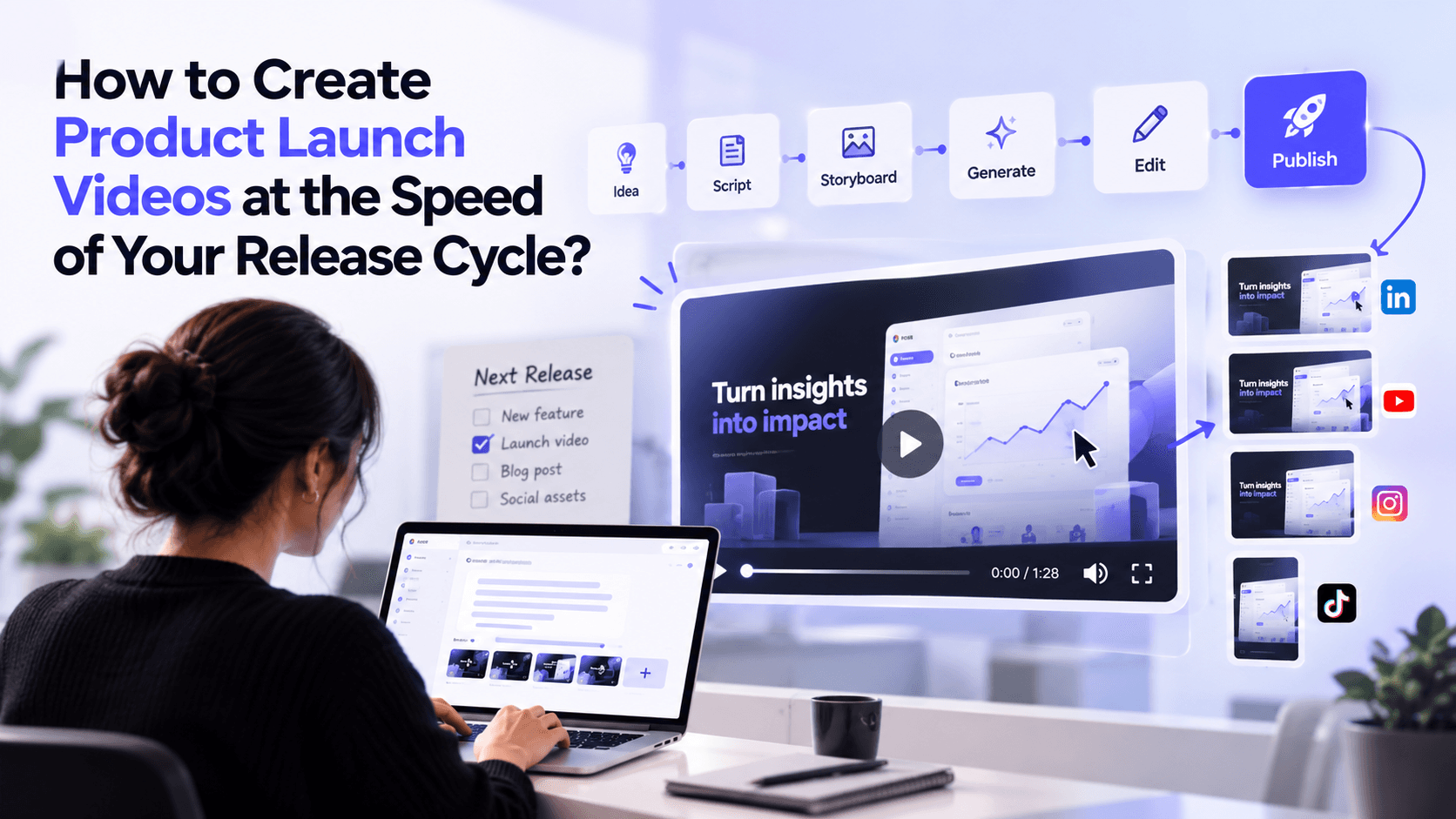
Your product team ships a new feature on Monday. Marketing gets the details on Tuesday. The script is ready by Thursday, but the video still needs visuals, voiceovers, edits, and approvals.
By the time everything is ready, the launch has already happened.
Sound familiar?
For SaaS companies releasing new features every few weeks, this is a common problem. Product development moves fast, but video production often moves much more slowly.
The solution isn't to rush every video. It's to build a production workflow that keeps pace with your release cycle.
Here's how to create product launch videos faster without compromising quality, accuracy, or brand consistency.
Why Do Product Launch Videos Fall Behind Release Cycles?
Traditional video production involves several steps. Someone writes the script, a designer creates the visuals, an editor assembles the video, and different teams review the final version.
Each handoff takes time.
Things get even harder when product details change close to launch. A new interface, updated feature name, or revised release date can send the video back into editing.
Most teams face four common problems:
- Late involvement: Marketing starts planning the video only after the product is nearly ready.
- Too many dependencies: Scripts, visuals, voiceovers, and edits involve different people or external agencies.
- Lengthy approvals: Product, marketing, and leadership teams review the same video at different stages.
- Last-minute changes: Even a small product update can require multiple rounds of editing.
The result? Videos arrive late, or teams skip them entirely.
To keep up with frequent releases, video creation needs to be part of the launch process, not a separate project.
What Type of Product Launch Video Do You Actually Need?
Not every release needs a polished two-minute promotional video.
A minor feature update might only need a short announcement. A major product launch may require a detailed explainer or demonstration.
Choosing the right format early saves considerable production time.
Video Type | Best Use Case | Suggested Length |
|---|---|---|
Product Announcement | Introducing a new product or major release | 30-90 Seconds |
Feature Launch Video | Highlighting a specific new capability | 30-60 Seconds |
Product Demo | Showing how a feature works | 1-3 Minutes |
Product Explainer | Explaining the problem, solution, and benefits | 60-120 Seconds |
Social Media Teaser | Building interest before launch | 15-30 Seconds |
These are starting points, not strict rules. The right length depends on your audience, channel, and message.
For example, a new dashboard filter might need a 30-second walkthrough. An entirely new analytics platform deserves a more detailed explanation.
The goal is to create enough video to communicate the value, not more video than the release requires.
How to Create Product Launch Videos at the Speed of Your Release Cycle
A faster workflow starts before the product is ready for release.
Here are six steps that help product marketing teams create videos without slowing down launches.
1. Start With a Clear Product Release Brief
Don't wait until the feature is finished to begin planning.
As soon as the product team confirms what's being developed, collect the information needed for the video.
Your release brief should answer:
- What feature or product are we launching?
- Who is the target audience?
- What customer problem does it solve?
- What's the biggest benefit?
- What should viewers do after watching?
- Which product details are still likely to change?
Keep this brief short. A single page is usually enough.
For example, suppose your SaaS company is launching an automated reporting feature.
Instead of describing every technical capability, focus on the customer outcome: users can generate recurring reports without manually exporting data.
That becomes the central message of your video.
2. Build the Script Around the Customer Problem
A good product launch video doesn't simply list features. It explains why the release matters.
Use a simple structure:
- Problem: Show the challenge your audience faces.
- Solution: Introduce the new product or feature.
- Demonstration: Explain or show how it works.
- Benefit: Highlight what changes for the customer.
- CTA: Tell viewers what to do next.
For the automated reporting example, the opening might be:
"Still spending Friday afternoons preparing reports? Our new automated reporting feature handles the repetitive work for you."
That tells viewers why they should care before introducing the technical details.
Keep sentences short and avoid unnecessary jargon. Viewers should understand the main benefit even if they're unfamiliar with the product.
3. Create the Storyboard Before the Final Release
Once the script is ready, map out what viewers will see.
A storyboard doesn't need to be complicated. It simply connects each part of the script with the appropriate visual.
For example:
- Scene 1: An employee manually preparing reports.
- Scene 2: Introduce the new automated reporting feature.
- Scene 3: A demonstration of the reporting workflow.
- Scene 4: Key benefits appear through motion graphics.
- Scene 5: The product logo and CTA close the video.
This allows marketing teams to prepare most of the video while development continues.
AI-powered video production also becomes useful here.
Platforms like GaiN can help turn an idea or script into a storyboard and video draft, combining visuals, motion graphics, narration, and other production elements.
Instead of coordinating every asset separately, teams can work through a more connected production process.
4. Use AI to Produce the First Draft Faster
Traditional video production often requires separate tools for scriptwriting, visual design, voiceovers, animation, and editing.
AI video production platforms can reduce those dependencies.
With the right platform, teams can:
- Turn release information into a structured video draft.
- Generate supporting visuals and motion graphics.
- Add voiceovers without arranging recording sessions.
- Apply existing brand assets and visual guidelines.
- Refine the draft through feedback and editing.
For product marketing teams, the biggest advantage isn't simply generating a video quickly.
It's having a usable first draft while there's still time to review it.
GaiN supports this approach by bringing scripting, storyboarding, visual production, and editing into a connected workflow.
Its organisational knowledge capabilities also help teams create content using relevant company information rather than relying entirely on generic AI-generated messaging.
However, product accuracy still requires human review. Use approved screenshots or recordings when demonstrating actual functionality, and verify any AI-generated claims before publishing.
5. Make Last-Minute Changes Without Rebuilding Everything
Product releases rarely go exactly as planned.
A feature name changes. The interface gets updated. The launch date moves forward.
These changes shouldn't force your team to recreate the entire video.
A better approach is to separate stable content from details that may change.
Keep stable elements reusable:
- Brand introduction and closing scenes
- General customer problem
- Visual identity and design elements
- Background music and transitions
Keep changing elements easy to update:
- Product screenshots
- Feature names and descriptions
- Specific claims and statistics
- Pricing or availability details
- Launch dates and CTAs
For instance, if the reporting dashboard changes before launch, only the demonstration scene may need updating.
With GaiN's natural-language editing capabilities, teams can request changes to specific scenes instead of repeating the complete production process.
This is particularly valuable for SaaS businesses where product interfaces and functionality change frequently.
6. Repurpose One Launch Video Across Multiple Channels
Creating separate videos for every marketing channel adds unnecessary work.
Instead, plan one main launch video and adapt it for different audiences and platforms.
A 90-second product launch video could become:
- A 30-second LinkedIn announcement.
- A 15-second teaser for social media.
- A short feature demonstration for an email campaign.
- A product walkthrough for your website.
- A sales enablement clip highlighting the main benefit.
Not every version needs the same opening or CTA.
For LinkedIn, lead with the customer problem. For a product page, show the feature sooner. For sales teams, focus on the benefit that addresses buyer objections.
Planning these variations during storyboarding makes repurposing much easier.
How Can AI Keep Product Launch Videos Consistent Across Releases?
Speed matters, but consistency matters just as much when you're publishing videos regularly.
Without a shared production system, every launch may look and sound different.
One video uses a formal voiceover. Another uses different colours. A third describes the product using outdated terminology.
That weakens brand recognition and creates additional review work.
AI video production platforms can help by bringing reusable assets and production rules into one place.
For example, GaiN's Brand Kit and organisational context capabilities allow teams to work with established brand guidelines, assets, and company knowledge.
This can help maintain consistency across product announcements, feature explainers, and other business videos.
The practical goal is simple: Your team shouldn't have to rebuild the brand, messaging framework, and production process every time a new feature ships.
AI handles more of the repetitive production work while marketers focus on storytelling, positioning, and accuracy.
How Do You Measure the Success of Your Launch Video Workflow?
Video views alone won't tell you whether your production process is keeping up with releases.
Track both production efficiency and business results.
Useful metrics include:
- Production turnaround time: How long does it take from the approved release brief to the final video?
- On-time publication rate: How many videos are ready when their corresponding features launch?
- Revision cycles: How many rounds of edits are required before approval?
- Video engagement: Are viewers watching long enough to understand the main message?
- Product adoption: Are viewers clicking through, trying the feature, or taking the intended action?
Compare these numbers across several releases.
If production time falls but videos become less accurate or effective, the workflow still needs improvement.
The objective is to publish useful videos consistently, not just produce more content.
Make Video Production Part of Your Release Cycle
Product launch videos shouldn't take longer to produce than the features they're promoting.
When marketing starts early, teams reuse approved assets, and editing becomes easier; video production can move much closer to the pace of product development.
AI makes that process more manageable by reducing repetitive production work and helping teams create, edit, and update content faster.
With GaiN, product marketing teams can bring their ideas, company knowledge, and creative direction into one video production workflow.
The result is a more repeatable approach to product launch videos, where every new release doesn't mean starting from scratch.
Frequently Asked Questions
1. How can you create a product launch video quickly?
Start with a short release brief, choose one key customer benefit, and build a simple script around it. AI video production tools can speed up storyboarding, visual creation, narration, and editing, while your team reviews the final video for accuracy.
2. What should a SaaS product launch video include?
A SaaS product launch video should introduce the customer problem, present the new feature, show how it works, and explain its main benefit. End with a clear CTA, such as trying the feature, booking a demo, or exploring the release.
3. Can AI create product launch videos without a video editing team?
Yes. AI video platforms can handle many production tasks, including scripting, visual generation, voiceovers, and editing. However, product marketers and subject matter experts should still review the messaging, demonstrations, and final output.
4. How do you update a launch video when product features change?
Use a modular video structure where demonstrations, feature descriptions, and CTAs can be edited independently. This lets teams update affected scenes without rebuilding the entire video.
5. How early should you start creating a product launch video?
Begin planning once the release scope and main customer benefit are reasonably clear. You can prepare scripts, storyboards, and reusable assets during development, while verifying final demonstrations and product claims closer to launch.
Arindam M— Technical and AI Content Writer
Building the AI production layer for enterprise video.