AI video agents: What they are and how agentic video production works
AI has already sped up individual parts of video production. You can generate a script, voiceover, image or video clip in seconds.
But creating a complete video is a different story.
Someone still has to decide what the video should say, turn the idea into a script, plan the scenes, create the right visuals, add narration, make edits and bring everything together.
AI video agents are starting to change that.
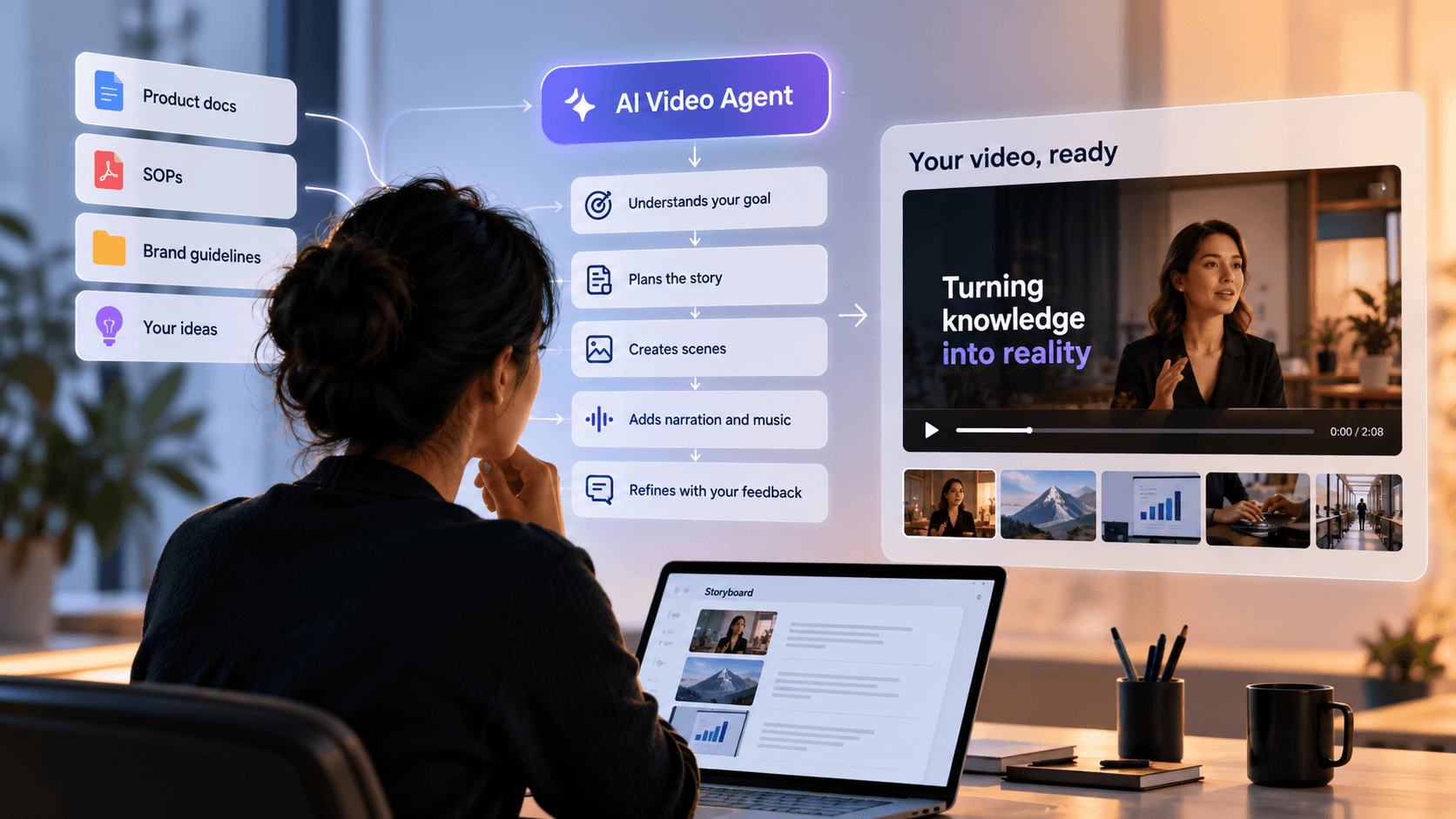
Instead of helping with just one part of production, an AI video agent can take a video goal and work through many of the steps needed to reach it. That shifts AI from a tool you operate at every step to a production partner you can direct.
Here's what that means in practice.
What is an AI video agent?
An AI video agent is a system that takes a video goal, works out the steps needed to achieve it, and carries them out to help produce the finished video.
The important word here is goal.
With a typical AI video tool, you might ask:
"Create a cinematic shot of a warehouse at night."
The tool generates that shot. You decide what comes before it, what comes after it, and how it fits into the larger video.
With an AI video agent, the request can be broader:
"Create a two-minute training video explaining our new warehouse safety process to employees."
Now there is more to work out.
What information should the video include? What should the opening explain? How many scenes are needed? Which scenes need diagrams or motion graphics? Where would realistic footage work better? What should the narration say?
The agent can help make those production decisions and carry out the work behind them.
In this article, AI video agent refers to an agent that helps create videos. The term is sometimes also used for conversational AI avatars that interact with viewers, which is a different use case.
AI video agent vs. AI video generator: What's the difference?
The simplest difference is this:
An AI video generator creates an asset. An AI video agent works toward a production goal.
A generator is useful when you already know what you need. You give it a prompt, and it might generate a video clip, image, voiceover or avatar.
An agent can take responsibility for more of what happens between the initial idea and the finished video.
Input | AI Video Generator | AI Video Agent |
|---|---|---|
You Provide | A Prompt | A goal or brief |
It Handles | A specific generation task | Multiple production steps |
Planning | Mostly handled by you | Can help plan the video |
Context | Often based on the current prompt | Can use project or business context |
Output | A clip, image, voice, or other asset | A connected video or video project |
Your Role | Operate individual tools | Direct, review, and refine |
Think about creating a product launch video.
With individual AI generators, you could use one tool to write the script, another to generate visuals, another for the voiceover, and an editor to put everything together.
Each tool may save time. But you still coordinate production.
An AI video agent moves some of that coordination into the system itself.
That's what makes the process agentic.
How does agentic video production work?
Agentic video production means giving AI the video goal and letting it handle more of the decisions and production steps required to create it.
Different platforms approach this differently, but the process generally follows seven stages.
1. Understand the brief
Everything starts with what you want to communicate.
You might provide an idea, document, product brief, or simple instruction. The agent needs to understand the video's purpose, who will watch it, and what the viewer should take away.
If important information is missing, it can ask questions before production begins.
This matters because "make a product video" isn't enough direction for a useful result.
A video for new customers may need a completely different story from one aimed at an internal sales team.
2. Gather the right context
A good business video needs more than a clever prompt.
The agent may need product information, company documents, SOPs, brand guidelines, reference material, or other knowledge supplied by the business.
This context helps the system create something that reflects what the organization actually knows and says.
The principle is simple:
The better the context, the less generic the video becomes.
For businesses, this is one of the most important differences between generating content and creating content that can actually be used.
3. Plan the story
Before making the scenes, the agent needs to decide what the video should say and in what order.
That means turning the brief into a narrative and the narrative into a storyboard.
For example, GaiN's video agents can develop a storyboard with scene-level narration, visual direction, and instructions for how each part of the video should be created.
This is an important step because a collection of good-looking clips doesn't automatically make a good video.
The scenes need to work together.
4. Decide how each scene should be made
Not every scene needs the same visual treatment.
Imagine a product video explaining a new analytics feature.
A scene showing how three metrics relate might work best with clear motion graphics. The opening scene may benefit from more cinematic imagery. A product demonstration may need another approach entirely.
An AI video agent can make these choices scene by scene.
In GaiN, for example, scenes can be routed between motion graphics and cinematic video depending on what the story requires. The user can still change that choice when needed.
Instead of selecting a tool for every individual task, the user can focus on whether the creative decision makes sense.
5. Create the video
Once the plan is ready, production begins.
Depending on the system, this can include generating visuals, motion graphics, narration, music and complete scenes.
Some parts of production can also happen at the same time rather than waiting for every previous task to finish.
The agent's role is to keep those individual pieces connected to the original brief and storyboard.
6. Review and refine
Agentic production doesn't mean the human disappears.
The user can review what has been planned or generated and give feedback.
That feedback can also become much simpler.
Instead of opening an editing timeline and changing every element manually, you could give an instruction such as:
"Make scene three shorter."
"Explain this in simpler language."
"Use the product interface in this scene."
The agent can work out which parts of the production need to change to follow that direction.
7. Assemble and render
Finally, the approved scenes, narration, music, and visual elements are brought together into the finished video.
So the entire process can be simplified to:
Brief → Context → Plan → Scenes → Generate → Review → Render
The major change is not that every individual step is new. It's that fewer of those steps need manual coordination by the person creating the video.
What changes when video production becomes agentic?
The biggest change isn't simply faster generation.
It's less coordination.
Consider a team creating an employee training video.
The information may already exist in a 30-page SOP. But someone still has to find the important information, write the script, create a storyboard, source or generate visuals, record narration, edit everything together, and manage revisions.
AI tools can speed up several of those jobs individually.
An AI video agent can help connect them.
That matters across many business teams.
An L&D team could turn an updated SOP into a new training video without rebuilding the production process from scratch.
A product marketing team could move from feature information to a launch video without waiting weeks for separate scripting, design, and editing work.
A sales enablement team could turn existing product knowledge into an explainer without sending another production request to marketing.
The shift is from:
Research → Script → Storyboard → Assets → Voiceover → Editing → Revisions
toward:
Brief → Review → Direct
There is still work involved. There are still decisions to make.
But the person creating the video spends less time moving work from one production step to another.
Does an AI video agent replace human control?
No. Agentic video production doesn't have to mean handing every decision to AI.
In fact, the most useful setup is usually one where the system handles more of the production work while people retain control over the decisions that matter.
An agent can draft the story, plan scenes, generate assets, assemble the video and carry out revisions.
People should still decide whether the message is right.
That includes checking factual accuracy, protecting sensitive information, deciding what fits the brand and approving the final creative direction.
This is particularly important for business video. A training video containing an incorrect policy or a product video promising something the product cannot do isn't useful simply because it was created quickly.
The better model, then, isn't human or AI.
It's human direction with agent execution.
That is also why GaiN approaches AI video as co-creation rather than black-box automation: the system can handle more of the production process without taking the final say away from the person directing it.
What should you look for in an AI video agent?
As more video platforms start using the word "agent," it's worth looking beyond the label.
A chat box alone doesn't make a video tool agentic.
Ask a few practical questions instead:
- Can it plan, or does it only generate? A video agent should be able to turn a broader goal into production steps.
- Can it use your actual business context? Brand guidelines, company knowledge and source material can make the difference between generic content and useful content.
- Can it choose the right approach for different scenes? Good production isn't about applying the same generation method everywhere.
- Can you review and change its decisions? More automation should not mean less control.
- How far can it take the project? Look at what still needs to happen manually between your initial brief and a video that's ready to use.
Ultimately, the useful question isn't whether a product calls itself an AI video agent.
It's how much of the production process it can understand, plan and carry out while keeping you in control of the result.
From operating video tools to directing video production
Generative AI made individual video tasks faster. AI video agents are beginning to connect those tasks into a complete production process.
That creates a simple but important change.
With a video generator, you tell AI what to make. With a video agent, you tell it what you're trying to achieve.
The system can then help work out how to get there.
With GaiN, teams can start with an idea or their own organizational knowledge, work with AI agents to research and structure the story, review the storyboard, generate the scenes, and refine the result without managing every production step themselves.
Frequently Asked Questions (FAQ's)
1. What is the difference between an AI video agent and an AI video generator?
An AI video generator usually creates a specific asset from a prompt, such as a video clip, image, or voiceover. An AI video agent can take a broader video goal, plan the steps needed to achieve it, create or coordinate the required assets, and help assemble them into a complete video. Put simply, a generator creates what you ask for; an agent works out how to get you to the video you need.
2. Can an AI video agent create a complete video from one idea or brief?
Yes, depending on the platform and the video's complexity. An AI video agent can take an idea or brief and handle several steps such as research, scripting, storyboarding, scene planning, visual creation, narration, and final assembly. However, business videos still benefit from human review to check facts, brand fit, and whether the final message achieves its purpose.
3. Do AI video agents replace video editors or production teams?
Not necessarily. AI video agents are better understood as a way to reduce the manual work involved in video production. They can handle tasks such as initial planning, asset creation, scene generation, and revisions, while people remain responsible for creative direction, factual accuracy, brand decisions, and final approval. For business teams, this can mean producing more videos without manually coordinating every step of production.
4. Can AI video agents use company documents and brand guidelines?
Some AI video agents can use business information such as product documents, SOPs, brand guidelines, and other source material to plan and create a video. This is especially useful for training, product marketing, sales enablement and internal communications, where the video needs to reflect the company's actual knowledge. Using business context also helps reduce generic output and keeps videos closer to the organization's message and brand.
5. How can you tell if an AI video tool is actually agentic?
Look at what happens after you provide the brief. A genuinely agentic video system should be able to make and carry out some production decisions instead of requiring you to select every tool and step yourself. That can include planning the story, breaking it into scenes, choosing how to create those scenes, generating the required assets, and responding to feedback. Adding a chat box to a video generator does not, by itself, make it an AI video agent.
Arindam M— Technical and AI Content Writer
Building the AI production layer for enterprise video.