AI Motion Graphics: How AI Is Changing Business Video Production
Motion graphics used to be one of the slower parts of business video production. A team would write the script, create a storyboard, hand it to a designer, animate each scene, review the video, and send revisions back.
AI is shortening that process.
But speed is only part of the story. AI motion graphics are also changing who can create business videos, what companies can turn into video, and how quickly they can update those videos.
For product marketing, training, sales, HR, and internal communication teams, that could be a much bigger change than simply saving a few hours of animation work.
What Are AI Motion Graphics?
AI motion graphics are animated visual elements created or arranged with AI. They can include text, shapes, charts, icons, diagrams, product interfaces, logos, and other graphic elements.
Traditional motion design requires a designer to make many animation decisions manually. That can include setting keyframes, timing movements, building transitions, and deciding when elements enter or leave the screen.
AI can handle more of that work from a simple instruction.
For example, instead of manually animating a product workflow, you could describe what the scene needs to explain. The system can then help turn that direction into a moving visual.
This is different from cinematic AI video.
Motion graphics work well when information needs to be clear and precise. Cinematic video suits people, environments, emotion, and visual storytelling better.
A product explainer may need both.
How Is AI Changing the Motion Graphics Workflow?
The biggest change is not that AI can animate an object.
It is that more of the work between an idea and a finished scene can now happen in one connected process.
1. Teams can start with an idea, not a finished storyboard
The traditional workflow often requires several decisions before animation begins.
What should the script say?
Which scenes are needed?
What should appear on screen?
Which information should be animated?
How should each scene transition?
AI can help move some of these decisions earlier into the production process.
A team could start with a brief such as:
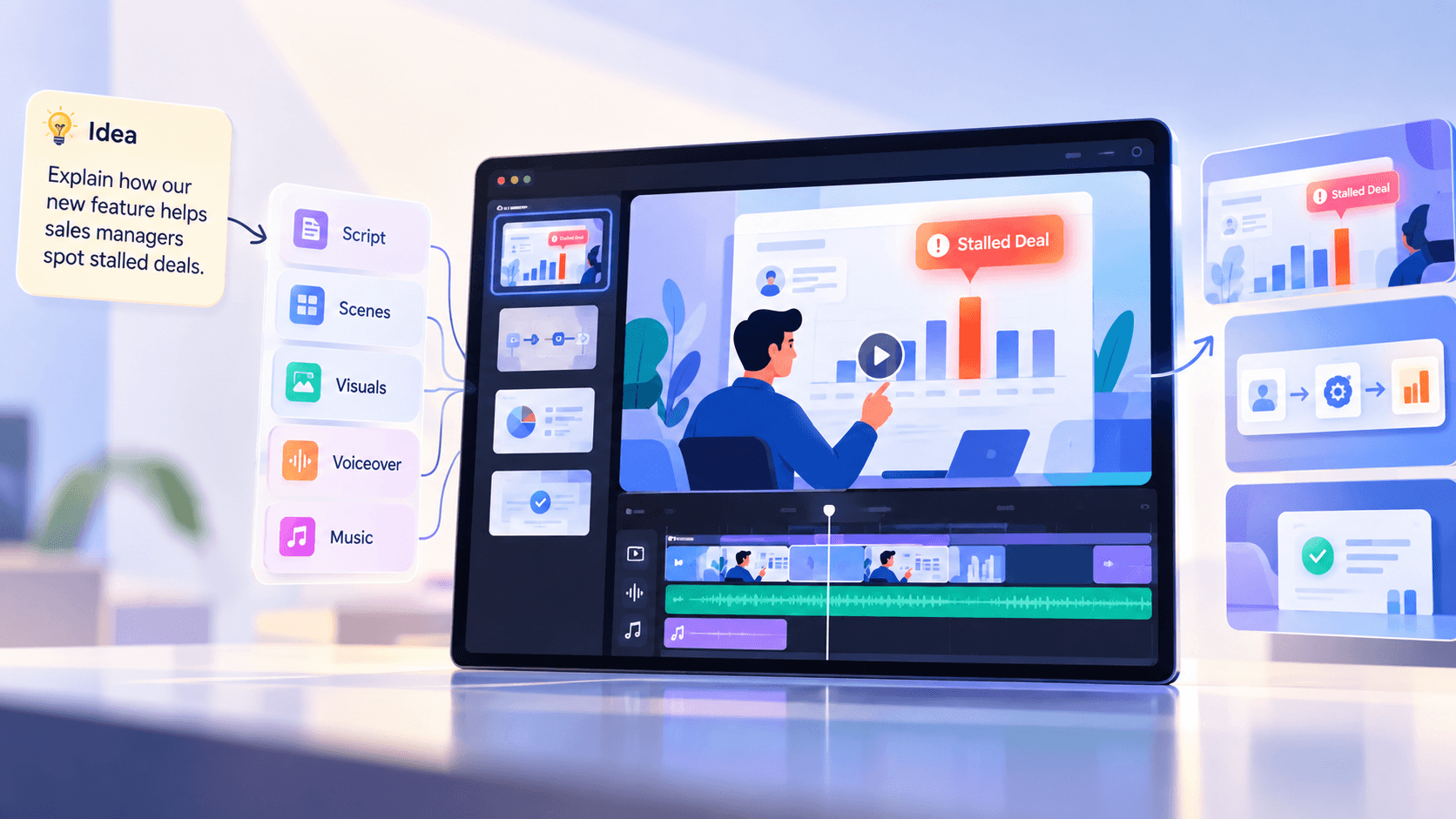
“Explain how our new reporting feature helps sales managers spot stalled deals.”
The production system can turn that idea into a narrative, break it into scenes, and decide how to show those scenes visually.
That is very different from giving an animator a completed storyboard and asking them to execute it.
2. Natural-language direction reduces manual animation work
Traditional motion graphics rely heavily on timelines, layers, keyframes, and other controls.
Those tools are still useful when you need precise manual control. But not every business video needs to begin there.
AI lets you give direction in plain language.
A user might ask to:
- Make the headline appear earlier.
- Highlight the third bar in a chart.
- Slow down a product walkthrough.
- Replace an icon.
- Shorten a scene.
- Make the transition less distracting.
The important change is accessibility.
A product marketer or training manager does not need to become a motion designer just to communicate what needs to change.
3. Motion graphics can become part of everyday business content
Businesses have always had information that could work well as video.
The problem is that not all of it was worth putting through a full production cycle.
Think about:
- a new product feature,
- an updated sales process,
- an employee onboarding step,
- a new company policy,
- a customer tutorial,
- an internal announcement.
If every video requires days or weeks of specialist work, teams naturally save video for larger projects.
AI changes that calculation.
The question becomes less about “Is this important enough to justify producing a video?” and more about “Would people understand this better as a video?”
That is an important shift.
Why Do AI Motion Graphics Matter for Business Video?
For businesses, AI motion graphics aren't just about making animations look impressive.
The real value is making visual communication easier to produce and repeat.
Faster product communication
Product teams regularly need to explain features, workflows, updates, and benefits.
Motion graphics can show an interface, highlight a button, demonstrate a process, or visualize what happens behind the scenes.
Instead of explaining a workflow through several paragraphs, a short animated sequence can show the same idea directly.
AI makes it easier to produce these videos as quickly as products change.
Easier training and onboarding
Training content often contains processes, systems, steps, and concepts that are difficult to communicate through talking-head videos alone.
Motion graphics can turn those ideas into visual explanations.
For example, an onboarding video could animate the steps for requesting leave. A compliance video could visualize a decision process. A training video could break a complicated workflow into five simple stages.
The goal is not animation for decoration. It is using movement to make information easier to follow.
More useful sales content
Sales teams often work with data, comparisons, product capabilities, ROI calculations, and process explanations.
Those are natural motion graphics use cases.
Instead of sending another static deck, a sales enablement team could create a short video showing how a product works or explaining why one approach saves time.
And when the information changes, the video should not need to become a major production project again.
More video without building a larger production team
This may be the biggest business impact.
AI does not mean companies no longer need designers, editors, or creative judgment.
It means those specialists do not necessarily need to manually build every simple scene.
They can spend more time on the parts that require taste, storytelling, brand decisions, and creative direction while AI handles more repetitive production work.
Where Do AI Motion Graphics Work Best?
AI motion graphics are particularly useful when a video needs to explain something clearly.
Business Need | What Motion Graphics can show | |
|---|---|---|
Product Marketing | Features, UI, workflows, launches | |
Learning and Development | Processes, concepts, SOPs, data | |
Sales Enablement | Comparisons, ROI, benefits, statistics | Comparisons, ROI, benefits, statistics |
HR & Onboarding | Policies, systems, employee processes | |
Customer Education | Tutorials, steps, product usage | |
Marketing | Key messages, data, product benefits |
This distinction matters because not every scene should become a motion graphic.
Sometimes the audience needs to understand.
Sometimes they need to feel.
The best business videos know the difference.
AI Motion Graphics vs. Cinematic AI Video
Motion graphics and cinematic AI video are often grouped together. They solve different problems.
Motion graphics are strongest when precision matters.
Think:
- readable text,
- charts,
- diagrams,
- product features,
- interface elements,
- numbers,
- step-by-step processes.
Cinematic video is strongest when emotion and atmosphere matter.
Think:
- people,
- physical environments,
- customer situations,
- storytelling,
- mood,
- visually rich scenes.
A business video may need both.
Imagine a company introducing a new analytics product.
The opening scene could show an overwhelmed sales manager moving between spreadsheets and dashboards. A cinematic scene can communicate that frustration quickly.
Then the video needs to explain how the product solves the problem.
That is where motion graphics can take over. The interface appears. Data moves through the workflow. Important numbers are highlighted. The viewer sees exactly how the product works.
This scene-by-scene choice is also how GaiN approaches video production. Its Motion + Cinematic system can route scenes to motion graphics when precision is needed and to cinematic visuals when the story needs more emotion, while still letting the user choose manually.
The point is not to choose one format for an entire video.
It's about choosing the right visual treatment for what each scene needs to communicate.
AI Makes the First Draft Faster. Control Makes It Useful.
There is an important difference between creating an impressive AI animation and using AI motion graphics in a real business workflow.
Business content has rules.
The logo needs to be correct.
The product name cannot change.
The chart needs the right numbers.
Text must be readable.
Brand colors need to stay consistent.
A product interface should not suddenly look different between scenes.
That is why control and repeatability matter.
Current AI-video production discussions increasingly focus on this issue. Generative visuals can capture the overall look while getting small brand details wrong, and those small errors become a bigger problem when companies produce content at scale.
The same applies to revisions.
If a product name changes next month, creating another beautiful video from scratch is not the answer. Teams need to fix what is wrong without rebuilding everything else.
For business video, the ability to edit the output can matter just as much as the ability to generate it.
Does AI Replace Motion Designers?
No. It changes where their time is most valuable.
A motion designer does much more than move objects around a screen.
Good motion design requires decisions about hierarchy, timing, pacing, clarity, composition, and what the audience should notice first.
AI can reduce repetitive execution. It cannot remove the need for those decisions.
Someone still needs to ask:
- Is this the clearest way to explain the idea?
- Is the information correct?
- Does the animation help or distract?
- Does this look like our brand?
- Is the pacing right?
- Should this scene use motion graphics at all?
AI can help execute the answer.
People still need to decide what the answer should be.
What Does the Future of Business Motion Graphics Look Like?
The future is not about adding AI-generated movement to every scene. It is about knowing what should move, what to show, and which visual format will help the audience understand the message faster.
That is the approach behind GaiN. Instead of treating motion graphics as a separate step, GaiN brings scripting, scene planning, motion graphics, cinematic visuals, voiceover, music, and editing into one video production workflow. Teams stay in control of the direction while AI handles more of the production work from idea to finished video. The result is not simply faster animation. It is a more practical way for businesses to create and update videos at scale.
Frequently Asked Questions (FAQ's)
1. What is the difference between AI motion graphics and traditional motion graphics?
Traditional motion graphics are usually created manually using timelines, layers, keyframes, and animation software. AI motion graphics can automate parts of this work, helping teams turn instructions, scripts, data, or ideas into animated visuals faster while still allowing human review and editing.
2. Can AI create professional motion graphics for business videos?
Yes, AI can create motion graphics for product explainers, training videos, sales content, onboarding, marketing, and other business videos. For the best results, human direction is still needed to check brand consistency, accuracy, pacing, readability, and whether the visuals support the message.
3. Will AI replace motion graphic designers?
AI is more likely to change the motion designer's role than replace it. It can handle repetitive production work, while designers remain important for creative direction, visual hierarchy, storytelling, brand decisions, and the judgment needed to turn animation into effective communication.
4. What business videos benefit most from AI motion graphics?
AI motion graphics work especially well for product demos, explainer videos, training content, sales enablement, onboarding, tutorials, data visualization, and internal communications. They are most useful when a business needs to explain a process, feature, number, comparison, or complex idea clearly.
5. What is the difference between AI motion graphics and AI-generated video?
AI motion graphics focus on animated design elements such as text, charts, icons, diagrams, UI, and shapes. AI-generated cinematic video is better suited to people, environments, actions, mood, and storytelling. Business videos can combine both, using motion graphics for precise explanations and cinematic scenes when emotion or context matters.
Arindam M— Technical and AI Content Writer
Building the AI production layer for enterprise video.